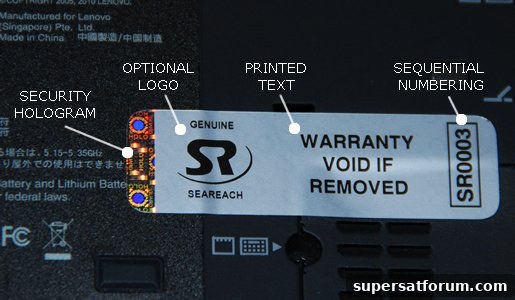
One of the reasons you bought that electronic device was the promise of a long-term warranty. You assumed that if something went wrong, repair or replacement would be straightforward. Then a problem occurred and you called the manufacturer—only to be told the warranty was void. How did that happen? Unfortunately, this scenario is all too common.
You Downloaded Software
Installing or downloading software can sometimes void a warranty, depending on the manufacturer’s terms. For example, if downloaded software damages your hard drive or corrupts the data on it, many warranties won’t cover the resulting repair or data loss. That applies whether the damage is caused by malware, incompatible utilities, or poorly designed applications.
Software itself may carry its own limited warranty, but coverage varies widely between vendors. Before relying on any protection, read the software license and warranty information so you understand what, if anything, is covered.
You Replaced Parts
Upgrading internal components—such as memory (RAM), the hard drive, the graphics card, or the processor—can affect warranty status. Some manufacturers consider opening the device or replacing key parts as grounds for voiding the warranty, while others explicitly permit certain user upgrades.
Always check the device’s warranty language and any manufacturer guidance before making hardware changes. Some brands allow safe upgrades like additional RAM or a new hard drive without voiding coverage, but components such as the screen, CPU, or GPU are more likely to be excluded.
You Caused the Damage
Damage resulting from user actions is generally excluded from standard manufacturer warranties. Examples include drops, liquid spills, and electrical surges. If you spill coffee on a laptop or drop a smartphone, the manufacturer will usually refuse warranty service for those issues.
There is a potential alternative: homeowner’s or business insurance. If you added the device to your insurance policy, accidental damage might be covered even when the manufacturer’s warranty is not. Contact your insurer to confirm whether such incidents are included and what deductible applies.
Your Other Electronics
Portable devices such as MP3 players, tablets, and e-readers have similar restrictions. “Jailbreaking” or otherwise circumventing built-in protections and security measures commonly voids warranties. Likewise, attempts to open, modify, or repair some tablets and small devices can eliminate warranty coverage.
As with laptops, these smaller electronics may be insured under a homeowner’s or personal property policy if you listed them on the policy. That coverage typically requires you to add valuable items proactively, so check your policy details.
How to Protect Yourself
Before purchasing or modifying any expensive electronic device, carefully read the warranty terms and note what exclusions apply. Pay attention to clauses about user-installed software, permitted hardware upgrades, and accidental damage exclusions.
Consider purchasing additional protection if you need coverage for accidental damage, power surges, or user-caused incidents. Extended warranties, manufacturer-provided accidental damage protection plans, or third-party insurance can fill gaps that standard warranties leave open.
Finally, practice simple prevention: avoid risky downloads, back up your data regularly, use surge protectors, and handle devices carefully to reduce the chance of accidental damage. Taking these steps can help preserve both your device and any warranty coverage that applies.